


Advertisement


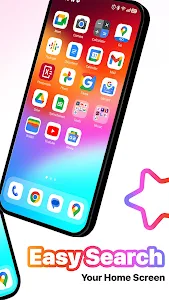


The clean, fluid interface of iOS has always appealed to many Android users. However, switching devices isn’t always the ideal choice. MiniPhone Launcher was developed to bridge that gap – bringing the elegant iPhone-style design to Android while preserving its flexibility and customization power.
More than just a visual makeover, MiniPhone Launcher enhances how you interact with your phone every day. From gestures to widgets, from app organization to performance, it delivers a refined experience that feels familiar, fast, and intuitive.
Below are 6 key reasons why MiniPhone Launcher is becoming a favorite choice for Android users worldwide.
Clean, Intuitive iOS-Inspired Interface
MiniPhone Launcher stands out with its simple, modern, and user-friendly design. The interface is carefully crafted to resemble iPhone X and newer models, featuring rounded app icons, smooth transitions, and a consistent visual style.
Everything feels natural – from swiping between screens to opening apps. The layout avoids clutter, helping users focus on what matters most. Whether you’re a first-time user or a long-time Android fan, you’ll feel comfortable navigating the launcher within minutes.
Smart App Organization & Fast Search
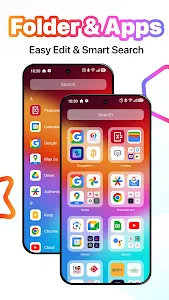
Managing dozens of apps can be frustrating, but MiniPhone Launcher makes it effortless.
- Apps are neatly arranged in a customizable grid
- You can move icons freely or group them into folders
- The App Library automatically categorizes apps (Social, Productivity, Entertainment, etc.)
- Access the App Library by swiping to the last home screen
Need something quickly? Just swipe down from the middle of the home screen to search apps, contacts, maps, or even web information – no manual sorting required.
Customizable Dock & Home Screen Widgets
At the bottom of the screen, the Dock keeps your most-used apps – such as Phone, Messages, Browser, or Music – always within reach. You can fully customize which apps appear there to match your habits.
MiniPhone Launcher also supports widgets, allowing you to see key information at a glance without opening apps. Add widgets for weather, calendar, clock, and more. You can move, resize, and organize widgets on the home screen or inside the Widget Library for a cleaner layout.
iOS-Style Gestures & Multitasking (X Home Bar)
One of the most loved features is the X Home Bar, which recreates iOS-style navigation gestures:
- Swipe up to return to the home screen
- Swipe up and hold to view recent apps
- Smooth switching between running apps
- Gesture-based back function
These gestures make one-handed use easier and significantly improve multitasking efficiency – especially on larger screens.
Quick Settings, Notifications & Dark Mode
MiniPhone Launcher ensures you stay informed and in control:
- Swipe down to view notifications like messages, emails, and missed calls
- Notifications are grouped by app and date for easy tracking
- Swipe from the top-right corner to access quick settings
From there, you can toggle Wi-Fi, Bluetooth, Airplane Mode, Flashlight, and adjust brightness or volume instantly.
For night use, Dark Mode reduces eye strain and can help save battery – perfect for users who spend long hours on their phones.
Security, Performance & System Integration
Beyond appearance, MiniPhone Launcher adds real functionality:
- App lock protection with pattern security
- Adjustable icon sizes and grid layouts
- Virtual menu button always available on screen
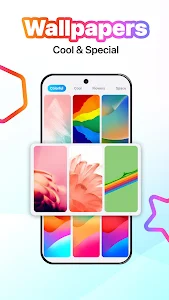
- Rich ecosystem of themes, wallpapers, widgets, and tools
To enable advanced features like recent apps, back gestures, and touch controls, the launcher requires Accessibility Services and Query All Packages permissions – used strictly to ensure smooth system-level interactions.
Why MiniPhone Launcher Is Worth Downloading
MiniPhone Launcher isn’t just about making your Android look like an iPhone – it’s about upgrading the way your phone feels. Every detail is designed with the user in mind: faster access, cleaner visuals, smoother gestures, and better organization.
If you want a launcher that balances aesthetic beauty, practical features, and stable performance, MiniPhone Launcher is a smart choice. It gives your Android device a fresh identity without sacrificing control or customization.
Download MiniPhone Launcher today and experience an iOS-style interface that truly works for Android.
Advertisement
Additional Information
- Version 10.0.1
- Requires Android 6.0+
- Update January 20, 2026
- Developed by SaS Developer
- Google Play ID com.xos.iphonex.iphone.applelauncher
Advertisement


