


Advertisement


There’s nothing more frustrating than needing a file right now — and realizing it’s stuck on another device. Mobile photos on your phone, work documents on your laptop, videos saved on your tablet — and everything feels scattered.
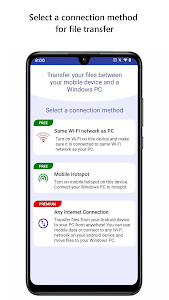
Mobile to PC File Transfer changes that experience completely. Designed for speed, convenience, and reliability, this app makes it easy to move files between your Android device and Windows PC using Wi-Fi, mobile hotspot, or even mobile data — no USB cables required.
Below is what makes this tool a favorite for users who want control over their files without complicated syncing tools or cloud storage limits.
Transfer Files Wirelessly — Anytime, Anywhere
Mobile to PC File Transfer lets you share files over:
- Wi-Fi
- Mobile hotspot
- Mobile network
As long as your devices are connected to the internet, file transfer becomes seamless.
At home, both devices can stay on the same Wi-Fi network. When you’re away, your phone’s data plan still lets you move files safely and quickly — perfect for work trips, school projects, and emergency file sharing.
No cables. No drivers. No extra hardware.
Access Everything on Your Phone or Tablet
Instead of only moving photos or selected folders, the app gives full access to:
- Internal storage
- SD cards
- Documents, images, videos, ZIP files, and more
From your Windows PC, you can:
- Browse folders
- Create new files
- Move items
- Delete unwanted content
It works like managing files directly on your computer — only now your phone storage becomes part of that workspace.
Secure File Sharing You Control
Privacy matters — especially when transferring personal or work files.
Mobile to PC File Transfer allows you to:
- Create multiple connection profiles
- Lock connections with passwords
- Prevent unauthorized access
You decide who connects, how they connect, and what they can see.
No third-party cloud servers. No unexpected uploads. Everything stays directly between your devices.
Easy Setup — Even for Beginners
You don’t need technical skills to use this app.
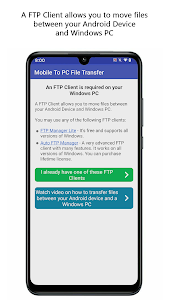
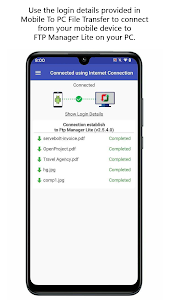
Mobile to PC File Transfer works perfectly with FTP Manager Pro for Windows, making setup smooth and intuitive. A built-in video tutorial shows exactly how to connect in minutes — and once configured, the app remembers your settings.
Highlights:
- Simple interface
- Quick connection steps
- Clear navigation
- Automatic restart when your phone reboots
Once set up, transferring files becomes as routine as opening a folder.
Faster Sharing for Photos, Music, Videos, and More
Whether you’re backing up photos, moving music playlists, transferring work files, or sharing videos, the app is built for speed and flexibility.
Users love it because:
- Large files transfer smoothly
- No compression, no quality loss
- No need to rely on messaging apps or cloud links
- No file size limits set by third-party platforms
From quick transfers to full backups — it handles everything with minimal effort.
Designed to Work Across Different Situations
Mobile to PC File Transfer is ideal for:
- Students organizing assignments
- Creators backing up photos and videos
- Professionals sharing work documents
- Everyday users freeing up storage space
With support for Android 10 and below — and special permissions for Android 11 and newer — the app ensures stable access to your files while respecting system security rules. And if you ever get stuck, there’s a support forum ready to help.
A Smarter Way to Move Your Files
Technology should make life easier — and Mobile to PC File Transfer delivers exactly that. No more hunting for cables, emailing files to yourself, or waiting on slow cloud uploads. Instead, you get fast, flexible transfers between your devices whenever you need them.
If you’re looking for a reliable, user-friendly solution to manage files across Android and Windows, Mobile to PC File Transfer is absolutely worth trying. Download it, connect your devices, and discover just how effortless file sharing can be.
Advertisement
Additional Information
- Version 11.5
- Requires Android 8.0+
- Update January 1, 2026
- Developed by Deskshare, Inc
- Google Play ID deskshare.com.pctomobiletransfer
Advertisement


