


Advertisement


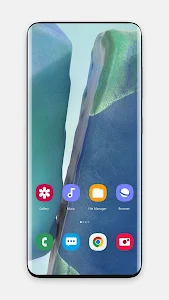
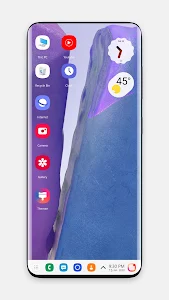

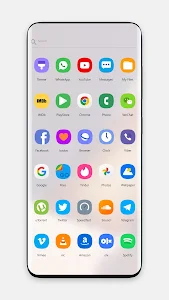


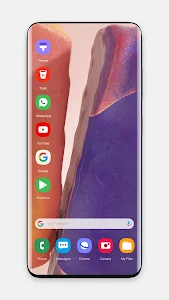


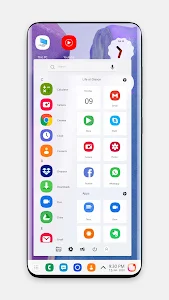


Turning on your phone shouldn’t feel boring. With the right theme, every swipe, every tap, and every screen can feel fresh, elegant, and premium — just like using a brand-new flagship device. With Note 20 Theme for Launcher, you don’t need to buy a new flagship device to enjoy that polished Galaxy-style design — you can simply install a theme and refresh your phone instantly.
This lightweight theme package brings the stylish Note 20 look to almost any Android device — especially low-end phones — while keeping performance smooth and battery-friendly.
Below is everything that makes this launcher theme worth downloading.
A Premium Galaxy Look Without the Premium Price
Note 20 Theme for Launcher was designed to mirror the elegant aesthetics of the Galaxy Note lineup. From icon styles to smooth animations, everything feels refined and contemporary.
- Sleek, high-resolution wallpapers
- Beautifully designed icons
- Modern UI elements inspired by Note 10 / Note 20
You get the visual upgrade of a high-end smartphone at absolutely no cost — the theme is completely free to download.
Optimized for Low-End Android Devices
A lot of themes look good at first — but slow your phone down afterward. This one is different.
The Note 20 theme is specifically optimized for:
- Older devices
- Low RAM phones
- Budget Android models
It’s lightweight, responsive, and doesn’t overload your phone with heavy visual effects. Even devices running older Android versions can enjoy the new look smoothly.
Stunning WQHD Wallpapers and Custom Icon Packs
Personalization is where Note 20 Theme for Launcher truly shines.
You’ll find:
- A collection of WQHD wallpapers
- Custom icon packs for popular apps
- Smooth icon animations
You can switch between multiple backgrounds until you find the one that fits your mood or style — from minimalistic to vibrant and colorful.
Deep Customization Without Complexity
Some launchers overwhelm users with too many options. This one strikes the perfect balance.
You can easily:
- Change icon sizes and grid layouts
- Customize folder colors and styles
- Apply gestures and transitions
- Choose from different drawer styles
No coding. No complicated settings. Just tap, apply, and enjoy.
Privacy, Security, and Smart Features Built In
Beyond visuals, Note 20 Theme for Launcher also focuses on usability and safety.
Helpful tools include:
- App lock to protect private apps
- Ability to hide apps from your home screen
- Battery, RAM, and storage monitoring
- Light, Dark, and Auto color modes
- Support for third-party icon packs
It’s not just “pretty” – it’s practical, secure, and user-friendly.
Wide Compatibility With Popular Launchers
You’re not locked into one system. Note 20 Theme works with many well-known launchers, including:
- ADW & ADW EX
- Google Now Launcher
- Other compatible launchers across devices
This means you can enjoy the Note 20 vibe regardless of the phone you own – Oppo, Samsung, Xiaomi, Vivo, and more.
A Simple Upgrade That Feels Like a New Phone
If you’re bored with your current home screen, craving something fresher, or simply love the Galaxy Note design – Note 20 Theme for Launcher delivers a premium upgrade without costing a cent.
You’ll get:
- A beautiful Note 20-inspired UI
- Faster and smoother navigation
- Deeper customization options
- Strong privacy and practical features
Instead of replacing your phone, refresh it — and enjoy a brand-new visual experience in just a few taps.
Download Note 20 Theme for Launcher today and give your Android device the stylish makeover it deserves.
Advertisement
Additional Information
- Version 5.0
- Requires Android 6.0+
- Update January 3, 2026
- Developed by Marwa Themes Studio
- Google Play ID com.theme.note10.computer.theme
Advertisement


