


Advertisement
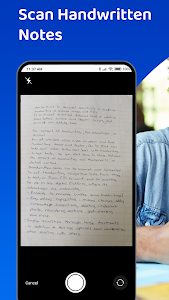



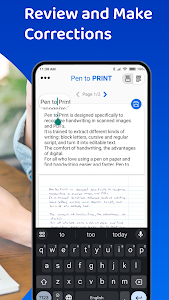


Stacks of handwritten notes, meeting scribbles, lecture pages, and personal journals often hold valuable information — but they’re hard to search, edit, or share. Turning those pages into structured digital content used to require scanners, desktop software, and time-consuming manual typing. That’s where Pen to Print – Handwriting to Text OCR changes the workflow entirely.
Designed specifically for mobile users, this powerful handwriting-to-text OCR app converts scanned handwritten notes into editable, searchable, and exportable digital text within minutes. No scanner. No complex setup. Just your phone camera and smart AI.
Below are six key reasons why Pen to Print stands out as one of the most reliable handwriting OCR solutions available today.
Advanced Handwriting OCR Built for Real Notes
Unlike generic scanner apps that struggle with cursive or messy writing, Pen to Print is engineered as a dedicated handwriting reader. Its AI-powered OCR engine is trained to interpret:
- Cursive handwriting
- Slanted or skewed pages
- Low-contrast photos
- Uneven lighting conditions
- Partially illegible text
The app automatically corrects common capture issues such as tilt, shadows, and perspective distortion. This ensures cleaner, more accurate results when converting images to text.
If your notes include fast lecture writing, personal shorthand, or old documents, Pen to Print offers significantly higher recognition accuracy than standard OCR tools.
Simple 4-Step Conversion Process
The workflow is designed for speed and convenience:
Step 1: Scan or Upload
Take a photo of your handwritten notes or upload an existing image.
Step 2: Convert Image to Text
The AI handwriting OCR engine processes the image and converts handwriting into digital text.
Step 3: Review & Edit
Use the built-in editor to verify accuracy, adjust abbreviations, and refine formatting.
Step 4: Export
Save as a Word document, TXT file, or share directly to cloud storage and other apps.
The entire process is optimized for mobile use, allowing you to digitize notes anytime, anywhere.
Fully Editable and Searchable Digital Text
Once converted, your handwriting becomes fully editable text. This means you can:
- Correct small OCR inconsistencies
- Reformat paragraphs
- Copy content into emails or documents
- Search for keywords instantly
Creating a searchable digital archive of handwritten documents dramatically improves productivity. Instead of flipping through notebooks, you can locate information within seconds.
For professionals managing meeting minutes or researchers handling historical documents, this feature alone can save hours of work.
Seamless Export and Cloud Integration
Pen to Print supports flexible export options so your workflow remains uninterrupted. You can:
- Export as Microsoft Word (.docx)
- Save as TXT files
- Share directly to cloud services
- Copy text into productivity apps
Whether you’re using Google Drive, Dropbox, or email platforms, the app ensures smooth image-to-text transfer. This flexibility makes it suitable for students, business teams, writers, and administrators alike.
Ideal for Students, Teachers, and Professionals
Pen to Print serves a wide range of users:
Students
Digitize lecture notes, homework, and study summaries into Word for easier editing and revision.
Teachers
Convert handwritten assignments quickly for grading or digital feedback.
Business Teams
Turn meeting notes into searchable action items and reports.
Writers
Transform handwritten drafts and notebooks into editable manuscripts.
Researchers & Genealogists
Transcribe historical letters and archival documents that are difficult to read manually.
If handwriting plays a role in your workflow, this app removes the friction between paper and digital systems.
Built Specifically for Mobile Efficiency
One of the biggest advantages of Pen to Print is that it eliminates the need for scanners or desktop software. Your smartphone becomes a portable handwriting capture tool.
The app is optimized for:
- Fast processing
- Clean interface design
- Minimal battery consumption
- Accurate AI recognition
Instead of relying on general OCR apps that focus mainly on printed text, Pen to Print specializes in handwriting recognition — making it a more reliable solution for complex scripts.
Turn Handwriting into a Digital Asset
Handwritten notes shouldn’t stay trapped on paper. With the right OCR technology, they become editable documents, searchable archives, and shareable files that integrate into your digital workflow.
Pen to Print offers a fast, accurate, and mobile-friendly way to convert handwriting to text — without complicated tools or technical knowledge.
Download Pen to Print today and transform your handwritten notes into powerful, organized digital assets that work for you.
Advertisement
Additional Information
- Version 1.30.0
- Update March 4, 2026
- Developed by Serendi LTD
- Google Play ID p2p.serendi.me.p2p
Advertisement


