





Every Android user knows the power button is one of the most frequently used — and also the first to wear out. Whether your device’s button is too sensitive, already damaged, or you simply want a more convenient way to lock your screen, Screen Off offers the perfect solution. This lightweight, reliable app lets you instantly lock or turn off your device with a simple tap, while also giving you more control, more accessibility, and a smoother daily experience.
Below is a complete breakdown of what makes Screen Off a must-have tool for every Android user.
Instantly Lock Your Screen in One Tap — No Power Button Needed
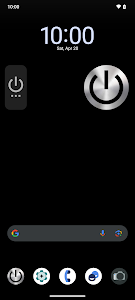
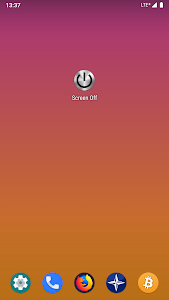
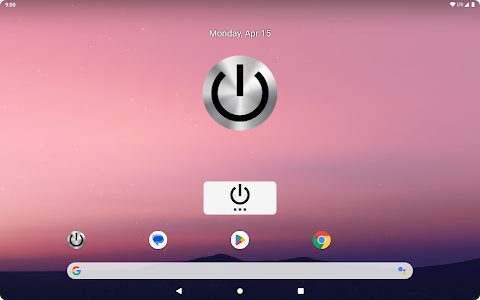
Screen Off eliminates the need to use your physical power button. With just a single tap, you can turn off or lock your screen instantly. This feature is especially valuable for users whose power buttons are broken, loose, or wearing out. Instead of dealing with hardware issues, you can lock your device effortlessly using a virtual button placed anywhere on your home screen.
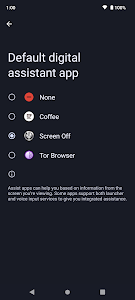
The app uses Accessibility API policies to perform this action securely, ensuring smooth performance on modern Android devices.
Unlock Easily With Fingerprint for a Seamless Experience
One of Screen Off’s standout features is its ability to unlock your device using the fingerprint reader, just like the physical lock button. This keeps your phone secure while maintaining ultra-fast access – a perfect combination of convenience and protection.
Whether your device is a phone or tablet, the fingerprint unlock ensures the user experience remains natural and uninterrupted.
More Ways to Control Your Device: Power Menu, Quick Settings Tile & Widgets
Screen Off gives you multiple tools to interact with your device more efficiently:
- Long-press to access the Power Menu
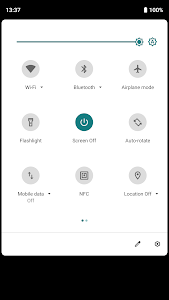
Quickly reach Restart, Power Off, or Emergency options without pressing any physical buttons. - Quick Settings Tile
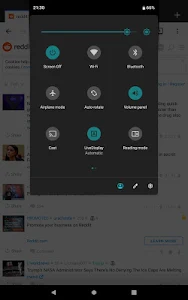
Add a lock tile to your notification shade for instant access anytime. - Resizable Home Screen Widget
Customize a virtual button that matches your screen layout and size preference.
These features make the app not only useful but also flexible, adapting to whatever workflow suits you best.
100% Free, No Ads, No Hidden Purchases, No Trackers
In a market full of apps overloaded with ads, pop-ups, or unclear permissions, Screen Off stands out with a refreshing promise:
- Completely free
- No hidden in-app purchases
- No trackers
- No suspicious permissions
It delivers a clean, privacy-friendly experience built for users who value transparency and safety. You get exactly what the app promises — nothing more, nothing less.
Essential Accessibility Support for Users With Physical Limitations
Screen Off is more than a convenience tool — it’s also a helpful accessibility solution. For users with motor disabilities or individuals who struggle with physical buttons, the app provides an easier, gentler way to control their device.
By using Accessibility API policies responsibly, Screen Off allows users to lock and manage their device without applying pressure or performing difficult gestures.
On older Android versions, it can also make use of Device Administrator permissions, with a simple guide included for removal when needed.
A Simple, Lightweight Tool That Just Works
Screen Off focuses on doing one job – locking the screen – and doing it perfectly. It has no complicated interface, no bloated features, and no unnecessary graphics. The app is extremely light, meaning it doesn’t drain battery, slow down your phone, or clutter your system.
Whether you’re protecting your power button, improving accessibility, or just looking for a smoother way to manage your device, Screen Off offers a reliable experience built for everyday use.
Final Thoughts
Screen Off delivers a clean, fast, and hardware-friendly way to lock your device with a tap. With fingerprint unlock support, widget customization, privacy-focused design, and accessibility features, it replaces the traditional power button with a smarter, more modern alternative.
If you’re ready to extend your device’s button lifespan and enjoy effortless screen control, Screen Off is absolutely worth installing today.
Advertisement
Additional Information
- Update December 15, 2025
- Developed by emveeha
- Google Play ID nl.matthijsvh.screenoff
Advertisement


