


Advertisement





Capturing your screen shouldn’t be complicated. Whether you need quick snapshots for work, detailed scrolling captures for research, or smooth screen recordings for tutorials, Screenshot Touch gives you everything in one powerful, easy-to-use app. With customizable settings, seamless editing tools, and support for both screenshots and videos, it transforms screen capturing into an effortless experience.
If you’re looking for a reliable and feature-rich screen capture app for Android, Screenshot Touch brings speed, precision, and control straight to your device.
One-Tap Screen Capture: Fast, Simple, and Always Accessible
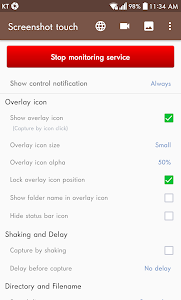
Screenshot Touch is designed for maximum convenience. Instead of using awkward button combinations, you can take a screenshot instantly using:
- A floating on-screen icon
- A tap from the notification panel
- A quick shake of your device
This flexibility makes it easy to capture the exact moment you need. Whether you’re saving important conversations, grabbing information on the fly, or capturing app screens for tutorials, Screenshot Touch ensures you never miss a shot.
The floating icon is customizable and always accessible – making the capture process smoother than ever.
Capture Full Web Pages with Built-In Scrolling Screenshot Tools
One of the standout features of Screenshot Touch is its ability to capture long, scrolling web pages directly within the app’s built-in browser. This is incredibly useful for saving:
- Articles
- Research pages
- Online receipts
- Tutorials
- Long social media threads
You can capture scrolling content in two convenient ways:
- Share a webpage URL from any browser → choose Screenshot Touch
- Open the URL directly through the app’s integrated browser
In both methods, the app stitches everything perfectly into one seamless image – no manual editing required.
Screen Recording with Full Customization
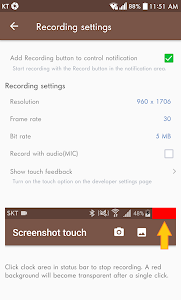
Need to create tutorials, demonstrations, or gameplay clips? Screenshot Touch includes a powerful screen recording feature that records videos in MP4 with adjustable settings:
- Resolution
- Frame rate
- Bitrate
- Audio on/off
Whether you’re making educational videos or capturing mobile gameplay, you have full control over quality and file size.
For content creators, the optional microphone recording helps you narrate in real time – perfect for walkthroughs or instructions.
Full Editing Suite: Cut, Annotate, Merge, and Convert
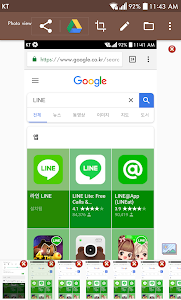
Screenshot Touch goes beyond simple capturing by offering a complete post-capture editing toolkit:
Photo Viewer:
- Tags
- Slideshow
- Hashtags
- ZIP sharing
Photo Editor:
- Drawing tools (pen, rectangle, circle)
- Text
- Stickers & emojis
- Opacity adjustments
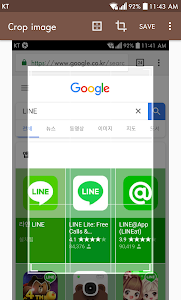
Crop Tool:
- Aspect ratios
- Rotation
- Text recognition (OCR)
Extra Tools:
- Image merging
- Convert image to PDF
Everything you need to polish, organize, and share your captures is included – no need for separate editing apps.
Smart Settings, Multiple Folders, and Full User Control
Screenshot Touch offers extensive customization to fit your workflow:
- Choose file format (JPEG, PNG, WebP, HEIF*)
- Set JPEG quality
- Customize save folders & subfolders
- Enable capture delay
- Use persistent notifications for faster access
The Multiple Save Folders feature is especially useful. You can sort screenshots by category – social media, work, gaming, browser captures – keeping everything organized without manually moving files later.
This level of control is rare in free screenshot apps, making Screenshot Touch ideal for heavy users, content creators, and professionals.
*WebP and HEIF formats are available with in-app purchase.
Privacy-Friendly, Transparent, and Easy to Use
Screenshot Touch respects your privacy. The app:
- Never collects or shares your images or videos
- Requires only essential permissions
- Does not capture anything without your clear action
- Uses Android’s Media Projection API safely
- Implements Accessibility APIs only for capture ease – not for data collection
Ads are included in the free version, but users can remove ads and unlock premium features with a one-time purchase.
This transparency makes Screenshot Touch a trustworthy choice for users who capture sensitive information.
Capture Everything, Effortlessly — Download Screenshot Touch Today
From one-tap screenshots to full-page captures, editing tools, video recording, and intelligent file management, Screenshot Touch delivers a complete and reliable screen-capturing experience. Whether you’re a student, professional, gamer, or casual user, this app makes saving, organizing, and sharing content faster than ever.
Download Screenshot Touch for free now and upgrade the way you capture your Android screen.
Advertisement
Additional Information
- Version 2.6.2
- Requires Android 7.0+
- Update December 15, 2025
- Developed by Daejeong Kim
- Google Play ID com.mdiwebma.screenshot
Advertisement


